Rules
Rule types, metrics, weights, imperatives, and checklist inclusion.
What a rule is
A rule is a condition tied to a number from your data. Rules are the most load-bearing part of the strategy: they drive the Rigor checklist, the case builder, the discipline score, rule verdicts in review, and most of what Gravitas measures.
Open the Rules tab (heading Trading Rules). Sort by reorders the list by name, weight, type, or category, which is useful once you have more than a handful.
Rules come in two flavors of seriousness. An imperative rule is non-negotiable, and in Rigor it can block actions until it is satisfied. Everything else is advisory: breaking it costs you score, not permission.
Write rules you intend to obey. A rule you break every day teaches you to ignore the checklist, which is worse than not having the rule.
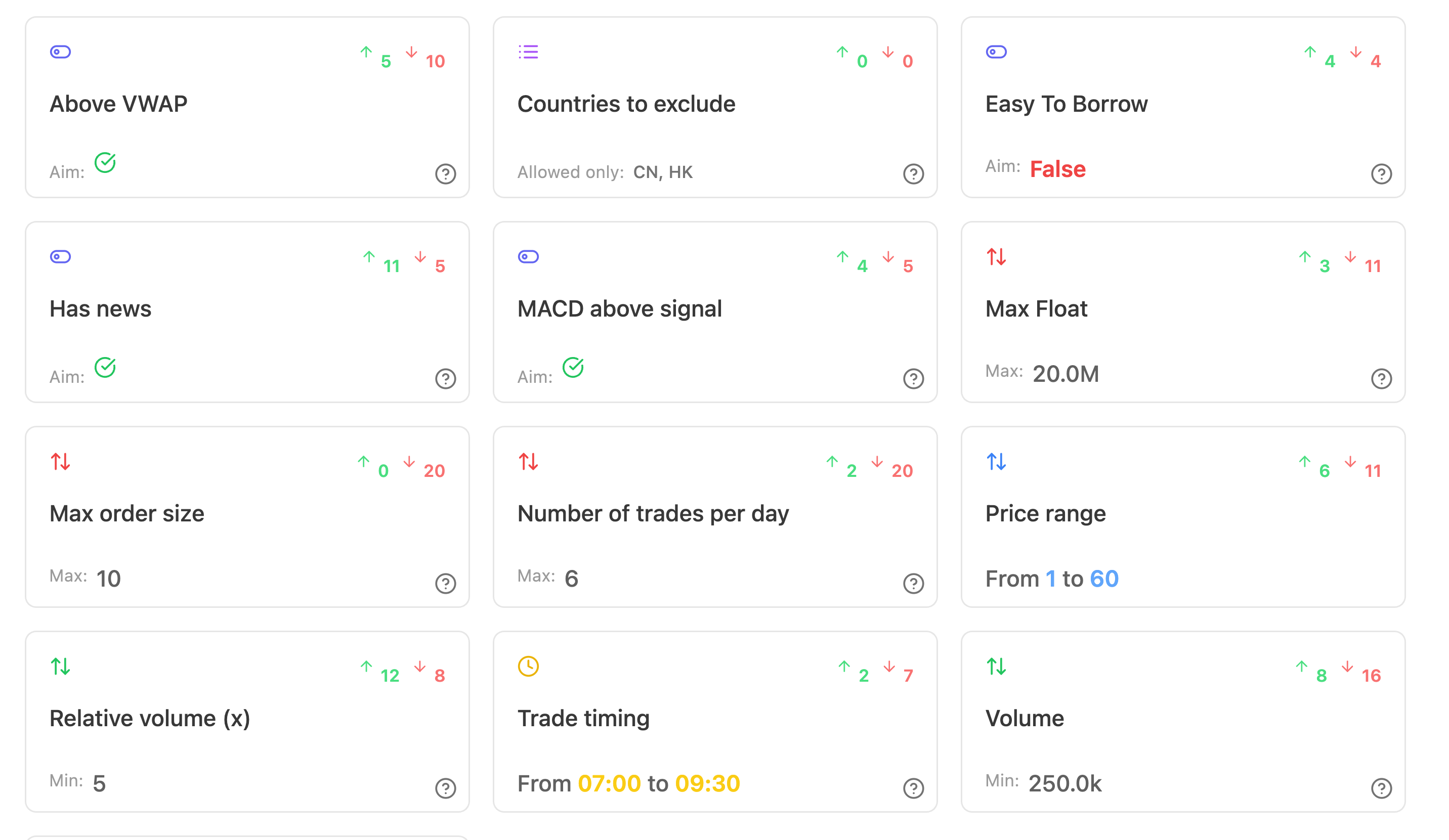
Rule types
Create New Rule lets you Create my own rule or start from a preset. Preset categories cover risk, session, and entry rules.
There are six rule types. The type determines which thresholds you can set and how a verdict is calculated.
| Type | What it checks | Fields |
|---|---|---|
| Range | The value sits between two bounds | Minimum Value, Maximum Value, plus preference for the top or bottom of the range |
| Minimum | The value is at or above a floor | Minimum Value |
| Maximum | The value is at or below a ceiling | Maximum Value |
| Time Window | The action happened inside a window | Start Time, End Time |
| Boolean | A condition is true or false | Preferred Value |
| Enumeration | The value is in a list | The list of values, plus Allow only these or Exclude these |
Range rules can also express preference inside the range: whether being closer to the top or closer to the bottom is better, and how much being above or below the range costs. That is how a rule like position size can say too small is mildly wrong and far too large is seriously wrong.
Enumeration rules work in both directions. An allow list says only these symbols, sides, or setups are acceptable. A block list says these are the ones you have proven you should stay away from.
Numeric rules also have a field type so the value is formatted correctly: plain number, decimal, price, or large number.
The rule editor
The editor has five tabs. Work through them in order the first few times.
1. Metric. Choose the Metric the rule reads, an optional Metric Variant, and the Metric scope: Overall, Calendar day, or Trade. The scope decides what the rule is checked against, which is the single most important choice here. See the Metrics topic.
2. Values. The thresholds for the chosen type: minimum, maximum, start and end time, preferred boolean value, or the list of enumeration values (added with Add).
3. Name. Name, Short Name, and Description. Short names are what you see in the Rigor checklist and the case builder, where space is tight, so make them readable at a glance. The description is what future you reads when wondering why the rule exists.
4. Weights. Positive Weight (0-20) and Negative Weight (0-20). See the next section.
5. Settings. Category for checklist grouping, Order in the list, Imperative, and Include in Checklist.

Weights and the discipline score
Every rule carries two weights, each from 0 to 20.
Positive Weight is what obeying the rule is worth. Negative Weight is what breaking it costs. They are separate on purpose, because obedience and violation are not symmetric.
Examples of that asymmetry:
- A hard loss limit might be worth little when respected (you are supposed to respect it) and cost a great deal when broken. Low positive, high negative.
- A rule about waiting for full confirmation might be worth a lot when respected, because it is the hard thing to do, and cost less when broken. High positive, moderate negative.
The weights feed two places. The discipline score sums them across evaluated rules and reports your score against the maximum available. The case builder in Rigor uses them to weigh the live argument for a trade.
Set weights relative to each other, not on an absolute scale. What matters is that your most important rule outweighs your least important one by a margin that feels right.
Imperative and checklist inclusion
Two switches on the Settings tab decide how a rule behaves while you are trading.
Include in Checklist puts the rule in the Rigor checklist grid, inside its category tab. Only checklist rules are things you tick in the moment. A rule that is not on the checklist is still scored from your data afterwards; it just does not ask you anything live.
Imperative marks the rule as non-negotiable. Imperative rules can block actions in Rigor until they are satisfied, which is how you stop yourself taking a trade before the mandatory checks are done.
Use imperatives sparingly. Three imperatives that genuinely stop you are effective. Ten imperatives become an obstacle course you learn to click through without reading, and then the mechanism is dead.